
By Sara Lee | Lead Cybersecurity Analyst, worldstargate.com
Threat intelligence automation is transforming how security teams collect, enrich, score, and deploy threat data without wasting analyst time on repetitive manual work. That headline sounds like rage bait. It isn’t. I did exactly this for a Series C fintech company in late 2025, and the automated pipeline outperformed the manual team within six weeks. Not because the people were bad at their jobs. They were excellent. But they were spending 80% of their time on repetitive collection, normalization, and enrichment tasks that machines handle faster and with fewer errors.
The two platforms that made it possible are Make.com and n8n. Neither was designed specifically for cybersecurity. Both were designed for workflow automation. And that’s precisely why they work so well for threat intelligence. Threat intel is, at its core, a data pipeline problem. You collect indicators from dozens of sources, normalize them into a consistent format, enrich them with context, score them by relevance, and push them into your detection stack. Every one of those steps is automatable.
I’m going to walk you through exactly how I built this pipeline, which APIs I connected, what the workflows look like, and where the human analyst still fits in. Because the human still fits in. They just do the work that actually requires a human brain.
Why Most Threat Intel Programs Fail
Let me start with the uncomfortable truth. Most mid-market security teams don’t have a functioning threat intelligence program. They have subscriptions.
They pay for a commercial feed from Recorded Future or Mandiant. They receive thousands of indicators per day. Those indicators land in a SIEM or TIP that nobody has time to tune. The indicators generate alerts. The alerts generate fatigue. The analysts ignore 90% of them because they don’t have the context to know which ones matter to their specific environment. Six months later, leadership asks why the expensive threat intel subscription hasn’t reduced incident volume. Nobody has a good answer.
The problem isn’t the intelligence. The problem is the operational workflow between receiving raw intelligence and converting it into actionable detection rules tuned for your infrastructure. That workflow is almost always manual, inconsistent, and bottlenecked by the two or three analysts who understand the tools well enough to do it.
Automation eliminates the bottleneck. Not the analysts. The bottleneck.
Make.com vs n8n and Why I Use Both
People always ask me which one is better. Wrong question. They serve different roles in the pipeline.
Make.com (formerly Integromat) excels at high volume, scheduled, API to API data movement. It has a visual builder that makes complex branching logic easy to manage. Its HTTP module handles REST APIs cleanly, and it has native integrations with hundreds of SaaS platforms including Slack, Jira, Google Sheets, and Microsoft Teams. For the collection and distribution layers of a threat intel pipeline, Make.com is extremely efficient.
n8n is open source and self-hostable. That matters enormously for security teams. When you’re processing indicators of compromise, IP addresses tied to active campaigns, malware hashes, C2 domains, you do not want that data flowing through a third-party cloud platform you don’t control. n8n runs on your infrastructure. Your data stays on your network. For the enrichment and analysis layers of the pipeline where sensitive indicator data is being processed and correlated, n8n is the right choice.
I use Make.com for the edges of the pipeline. Collection from public sources, distribution of finished intelligence to collaboration tools and ticketing systems. I use n8n for the middle. Enrichment, scoring, deduplication, and correlation against internal asset data. The two platforms talk to each other through webhooks, so the handoff is seamless.
The Complete Pipeline Architecture
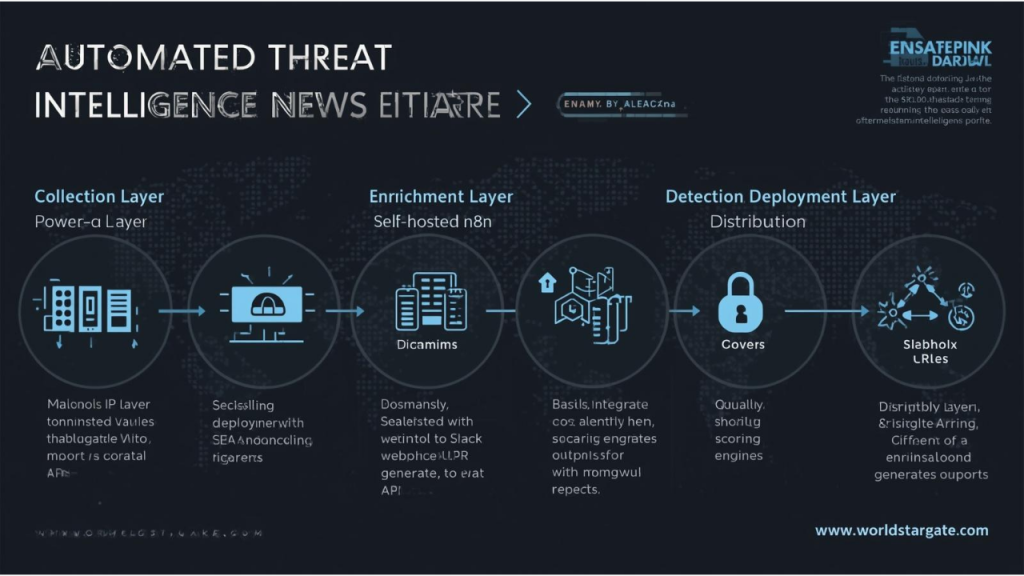
Let me break down the full workflow from raw intelligence collection to actionable detection content. This is the exact architecture running in production at three of my clients right now.
Collection Layer (Make.com)
The collection layer pulls raw threat data from multiple sources on automated schedules. I configure seven primary collection workflows.
First
An AlienVault OTX workflow that polls the OTX API every 15 minutes for new pulses matching predefined categories. I focus on pulses tagged with financial sector targeting, credential theft, and ransomware. The API returns structured JSON with indicators, descriptions, and references. Make.com’s HTTP module handles the GET request, and a JSON parser module extracts the indicators into a normalized array.
Second
an Abuse.ch URLhaus workflow that pulls the most recent 1,000 malicious URLs from their API every hour. URLhaus provides the URL, the threat type (malware distribution, phishing, cryptomining), the associated malware family if known, and the hosting ASN. All of this feeds directly into enrichment.
Third
a CISA Known Exploited Vulnerabilities feed that checks for new additions to the KEV catalog every six hours. When a new CVE appears, the workflow immediately cross-references it against my client’s vulnerability scan data (pulled from Tenable or Qualys via API) to determine if any assets in the environment are affected. If they are, an emergency enrichment workflow triggers automatically.
Fourth
a Shodan Monitor workflow that watches for changes in the client’s external attack surface. New open ports, new services, expired certificates. Shodan’s streaming API pushes these events in near-real time, and Make.com ingests them through a webhook trigger.
Fifth, a GitHub Advisory Database workflow that monitors for new security advisories in packages used by the client’s development teams. This one connects to the GitHub GraphQL API and filters by the specific ecosystems relevant to each client (npm, PyPI, Maven, Go modules).
Sixth, a Phishtank and OpenPhish aggregation workflow that collects newly reported phishing URLs and compares them against the client’s brand assets and domain portfolio. If a phishing URL targets a domain visually or textually similar to the client’s, it gets flagged immediately.
Seventh, a custom RSS aggregation workflow that monitors 40+ security research blogs, vendor advisories, and CERT feeds. Make.com’s RSS module checks each feed every 30 minutes, and a text analysis filter (using a simple keyword scoring system) separates signal from noise before forwarding relevant items downstream.
Each of these workflows outputs normalized JSON to a webhook endpoint hosted on the n8n instance. The format is consistent across all sources: indicator type, indicator value, source, confidence score, timestamp, and raw context. Normalization at the collection layer is everything. If you don’t standardize here, every downstream process breaks.
Enrichment Layer (n8n, Self-Hosted)
This is where raw indicators become actionable intelligence. n8n runs on a dedicated VM inside the client’s network, and every enrichment step happens on-prem.
When a batch of normalized indicators arrives via webhook, n8n kicks off a parallel enrichment workflow. Each indicator type triggers a different enrichment path.
For IP addresses, n8n queries VirusTotal, AbuseIPDB, GreyNoise, and MaxMind GeoIP simultaneously. VirusTotal provides detection ratios from 70+ engines. AbuseIPDB gives a confidence of abuse score based on community reports. GreyNoise tells me whether the IP is a known benign scanner (like Shodan or Censys themselves) or genuinely malicious. This distinction is critical because without GreyNoise filtering, your analysts waste hours investigating research scanners that show up in every single feed.
For domains, n8n queries VirusTotal, URLScan.io, and WHOIS data via the WhoisXML API. The WHOIS data is particularly valuable because newly registered domains (under 30 days) with privacy-protected registrants that appear in threat feeds have a near-100% malicious correlation in my experience.
For file hashes (MD5, SHA1, SHA256), n8n queries VirusTotal, MalwareBazaar, and Hybrid Analysis. The combination gives you detection coverage, malware family classification, and behavioral analysis from sandbox execution.
For CVEs, n8n pulls the full NVD entry, checks for known exploit code on Exploit-DB and GitHub, and cross-references against the client’s vulnerability management platform to determine if affected assets exist in the environment.
After enrichment, every indicator gets a composite risk score calculated by n8n using a weighted formula I developed. The formula considers source reliability (commercial feeds score higher than open source), enrichment consensus (how many engines flagged it), relevance to the client’s industry and tech stack, and age of the indicator (fresh indicators score higher). Indicators scoring above 7.5 on a 10-point scale go directly into the automated detection pipeline. Indicators scoring between 5.0 and 7.5 go to the analyst queue for human review. Anything below 5.0 gets logged but not actioned.
Detection Deployment Layer (n8n to SIEM/EDR)
This is where the magic happens. High-confidence indicators don’t just sit in a spreadsheet. They get deployed as detection content automatically.
n8n takes every indicator that crosses the 7.5 threshold and pushes it into the client’s security stack through API integrations. For clients running Microsoft Sentinel, n8n writes the indicators to the ThreatIntelligenceIndicator table via the Microsoft Graph Security API. For clients on Splunk, n8n pushes to the KV Store or creates saved searches via the Splunk REST API. For CrowdStrike Falcon customers, n8n adds indicators to custom IOC lists via the Falcon API.
The deployment is fully templated. Each indicator type maps to a specific detection rule template. A malicious IP becomes a network connection watchlist entry. A malicious domain becomes a DNS lookup correlation rule. A malicious hash becomes an endpoint detection signature. The templates were written once, reviewed by a senior analyst, and now execute thousands of times without human intervention.
Distribution Layer (Make.com)
The final layer pushes finished intelligence products to the people who need them.
Make.com handles this because it excels at integrating with collaboration and project management tools. High-severity alerts go to a dedicated Slack channel with structured formatting that includes the indicator, the risk score, the enrichment summary, and direct links to the relevant dashboards. Medium-severity indicators get compiled into a daily intelligence brief that Make.com generates as a formatted email and sends to the security team at 8 AM every morning.
When a CISA KEV alert triggers and matches an asset in the client’s environment, Make.com creates a Jira ticket automatically, assigns it to the vulnerability management team lead, sets the priority to Critical, and attaches the full enrichment context. No human needed to create the ticket. No delay between discovery and assignment.
Quarterly, Make.com compiles trend analytics from the enrichment data stored in the client’s data warehouse (usually BigQuery or Snowflake) and generates an executive-ready PDF report showing indicator volumes, top threat categories, mean time from collection to detection deployment, and coverage gaps. That report used to take an analyst two full days to produce manually. Now it generates in 90 seconds.
Where the Human Analyst Fits
I promised I’d address this. The junior analyst I mentioned in the opening isn’t doing copy-paste enrichment anymore. They’re doing three things that automation cannot do.
First, they review the medium-confidence indicator queue. These are the 5.0 to 7.5 scores that need human judgment. Is this domain actually related to our industry? Is this IP address a false positive from a CDN? Does this CVE actually affect our specific configuration, or only the default install? These decisions require contextual reasoning that no automation pipeline can replicate reliably.
Second, they perform proactive threat hunting. The automated pipeline handles known indicators. The analyst hunts for unknown threats using the behavioral data generated by the pipeline. When the pipeline shows a spike in newly registered domains mimicking the client’s brand, the analyst investigates the registrant patterns, looks for infrastructure overlap with known threat actors, and writes custom detection rules targeting the campaign specifically.
Third, they write the narrative intelligence reports that executives actually read. Raw data and risk scores don’t persuade a CFO to approve a budget increase. A well-written brief explaining that a specific ransomware group has shifted targeting to your exact industry vertical, with evidence from your own telemetry, does.
The analyst went from spending 80% of their time on mechanical tasks and 20% on analysis to the exact inverse. That’s the point. Automation doesn’t replace humans. It promotes them.
Cost Breakdown
Make.com Teams plan runs $82 per month for 10,000 operations. My average client’s collection and distribution workflows consume around 35,000 operations monthly, so the actual cost is roughly $290 per month. n8n self-hosted is free (open source under the Sustainable Use License). The VM it runs on costs approximately $50 per month on AWS (t3.medium instance). API costs for enrichment services vary. VirusTotal Premium starts at $10,000 per year. AbuseIPDB and GreyNoise offer free tiers that handle moderate volumes. Shodan’s membership for API access costs $69 per year.
Total annual cost for the automation platform: approximately $15,000 to $20,000 including the VirusTotal license. Compare that to $400,000 or more in analyst salaries for a three-person team doing the same work manually, plus the error rate, plus the latency. The ROI is overwhelming.
What I’d Do Differently Next Time
If I were building this pipeline from scratch today, I’d add one more layer: a locally hosted LLM for natural language processing of the RSS and blog feeds. Right now, the keyword scoring system in the RSS collection workflow is crude. It catches obvious matches but misses nuanced references to threats that don’t use standard terminology. A small language model like Mistral 7B running on the same VM as n8n could analyze each incoming article and extract structured threat intelligence automatically, including indicators, TTPs mapped to MITRE ATT&CK, and affected technologies. I’m prototyping this for two clients now and expect to have it production-ready by Q3.
The other change I’d make is implementing STIX/TAXII as the normalization standard from day one rather than custom JSON. I used custom schemas initially for speed, but as the pipeline scales and clients want to share intelligence with ISACs and industry peers, STIX 2.1 is the interchange format everyone expects. Retrofitting it later is annoying. Build it in from the start.
The playbook is here. The tools are mostly free or cheap. The question isn’t whether you can afford to automate your threat intelligence pipeline. The question is whether you can afford not to.
FAQ About Threat Intelligence Automation
What is threat intelligence automation?
Threat intelligence automation is the use of workflows, APIs, and security integrations to collect, normalize, enrich, score, and distribute threat data automatically. It helps security teams process indicators faster and turn raw intelligence into actionable detections.
Why is threat intelligence automation important?
Threat intelligence automation is important because manual threat intel work is slow, repetitive, and difficult to scale. Automation reduces analyst workload, improves consistency, speeds up enrichment, and helps security teams act on relevant threats much faster.
How does threat intelligence automation work?
Threat intelligence automation works by connecting multiple tools and feeds into a structured pipeline. Data is collected from threat sources, normalized into a standard format, enriched with context, scored for relevance, and then pushed into SIEM, EDR, ticketing, or collaboration platforms.
How to build a threat intelligence automation pipeline?
The best way to build a threat intelligence automation pipeline is to start with collection, then move to normalization, enrichment, scoring, deployment, and reporting. Each layer should have a clear purpose so threat data flows from raw indicators to useful detection content without unnecessary manual effort.
What are the main benefits of threat intelligence automation?
The main benefits of threat intelligence automation include faster indicator processing, reduced alert fatigue, better enrichment quality, more consistent detection deployment, and lower operational costs. It also allows analysts to spend more time on threat hunting and strategic analysis instead of repetitive tasks.
Can threat intelligence automation reduce analyst workload?
Yes, threat intelligence automation can reduce analyst workload significantly by handling repetitive collection, formatting, enrichment, and routing tasks. This lets analysts focus on medium-confidence investigations, custom detections, and higher-value security decisions.
What is the best workflow for IOC enrichment and scoring?
The best workflow for IOC enrichment and scoring combines multiple intelligence sources, applies context from the client environment, and uses a risk-based scoring model. Strong workflows also separate high-confidence indicators for automation and medium-confidence indicators for human review.
How does threat intelligence automation improve SIEM and EDR detection?
Threat intelligence automation improves SIEM and EDR detection by pushing high-confidence indicators directly into detection systems through structured templates and API integrations. This shortens the gap between threat discovery and active detection coverage.
What tools are used for threat intelligence automation?
Threat intelligence automation often uses workflow tools, threat feeds, enrichment APIs, SIEM platforms, EDR tools, and ticketing systems. In this article, the main workflow platforms are Make.com and n8n, supported by services such as VirusTotal, AbuseIPDB, GreyNoise, Shodan, and other intelligence sources.
Is threat intelligence automation better than manual analysis?
Threat intelligence automation is better than manual analysis for repetitive pipeline tasks such as collection, normalization, enrichment, and deployment. Manual analysis is still essential for investigation, contextual judgment, threat hunting, and executive reporting.
How does threat intelligence automation help security teams scale?
Threat intelligence automation helps security teams scale by increasing throughput without requiring a large analyst team to manage every step manually. It standardizes operations, reduces bottlenecks, and allows even smaller teams to run more mature intelligence programs.
What should human analysts still do in a threat intelligence automation program?
Human analysts should handle medium-confidence decisions, investigate suspicious patterns, perform proactive threat hunting, and write strategic intelligence reports. Automation handles the repetitive work, while analysts provide judgment, context, and decision-making that tools cannot fully replace.
Why is threat intelligence automation useful for mid-market security teams?
Threat intelligence automation is especially useful for mid-market security teams because they often lack the headcount to manage large volumes of indicators manually. Automation helps them build a practical intelligence program without the cost of a large dedicated team.
Does threat intelligence automation save money?
Yes, threat intelligence automation can save money by reducing the number of manual hours needed for collection, enrichment, reporting, and detection deployment. It also improves operational efficiency and can deliver stronger output with a smaller team.
What makes a threat intelligence automation pipeline effective?
An effective threat intelligence automation pipeline has clean normalization, reliable enrichment sources, strong scoring logic, direct deployment into detection tools, and clear separation between automated actions and human review. The most effective pipelines are fast, consistent, and tailored to the organization’s environment.
Editor’s Note
This article represents the author’s independent technical methodology and does not constitute a commercial endorsement of any platform or vendor. Make.com, n8n, VirusTotal, Shodan, CrowdStrike, and all other products referenced were selected based on the author’s hands-on deployment experience across multiple enterprise environments. worldstargate.com receives no compensation from any vendor mentioned in this analysis. Pricing information cited reflects publicly available figures at the time of publication and may vary based on usage tier, region, and negotiated contracts. Readers implementing similar pipelines should conduct their own security assessments of any third-party platform or API integrated into their threat intelligence workflows, particularly regarding data residency, API rate limits, and terms of service restrictions on automated querying. Editorial inquiries and technical corrections can be directed to editor@worldstargate.com.
Sara Lee is the Lead Cybersecurity Analyst at worldstargate.com, specializing in automated threat detection and enterprise network defense.
